

Troubleshooting LTE & 5G Networks in Complex Environments

Share

Downtime isn’t just inconvenient — in industries like manufacturing, logistics, and healthcare, it’s costly and can halt critical operations entirely. With the growing adoption of LTE and 5G private networks, IT teams face new challenges: maintaining flawless coverage, avoiding interference, and quickly fixing issues without deep RF engineering backgrounds.
In this guide, we’ll walk you through the key strategies, tools, and best practices for diagnosing and resolving LTE/5G private network problems — combining real-world field experience with the latest advancements in network survey technology.
1. Design for Coverage Where It Matters Most
In modern warehouses and factories, automated guided vehicles (AGVs) and sensors often operate just 20 cm above the floor. Network planning must guarantee full coverage at this height, including between racks and in areas where metal boxes or fully loaded shelves can obstruct signals. A site acceptance survey post-installation is critical to validate that 100% coverage is achieved across the entire operational zone.
2. Always Start with a Solid Floor Plan and Equipment Prep
When issues arise, speed is critical. Access the building’s floor plan (from your management platform if needed) and ensure it includes antenna and small cell locations. Then grab your essential tools: a lightweight scanner, spectrum analyzer, Android tablet with the survey app, and a USB connection. This preparation sets you up for a precise and efficient field investigation.
3. Use Spectrum Analysis to Pinpoint Interference
Before diving into network specifics, run a spectrum analyzer scan to detect frequency activity, signal strength, and interference sources — whether from other indoor equipment or external macro networks. Switch between LTE and 5G bands as needed, and don’t overlook the possibility of industrial machinery creating interference in certain frequency ranges.
4. Run PCI Scans for Detailed Network Health
A PCI scanner allows you to identify and monitor channels, either via blind scan or by targeting known frequencies. This can be done in real time on-site or remotely if a scanner is already deployed in the facility. Once channels are identified, log measurements directly onto your floor plan to visualize performance and quickly locate problem areas.
5. Document and Annotate for Actionable Repairs
When you find weak coverage or faulty equipment, annotate the location on your digital floor plan, take pictures, and mark up details. This gives field technicians all the visual and contextual information needed to fix the issue quickly. Whether it’s replacing a small cell, relocating an antenna, or addressing damaged cables, clear digital documentation speeds up the resolution process.
6. Re-Survey After Every Fix
Troubleshooting doesn’t end with the repair. Conduct a new site survey to ensure all KPIs — like RSRP, RSRQ, and SINR — meet the required thresholds. The goal is to see no “blue zones” (weak signal) on your coverage map. This final validation ensures AGVs, sensors, and connected devices operate without interruptions.
7. Keep Everything in a Digital Twin
Store all measurements, images, annotations, and survey results in a centralized cloud platform for ongoing reference. This digital twin enables remote access, easy integration with network design tools, and a consistent data format across the entire iBwave ecosystem — from design to deployment to maintenance.
Why Private LTE & 5G Networks Are Business-Critical
Industries from manufacturing to healthcare are embracing private LTE and 5G to handle secure, high-bandwidth, low-latency connectivity needs. These networks:
- Manufacturing: Power smart factories, real-time IoT control, predictive maintenance, and automation.
- Healthcare: Enable telemedicine, remote monitoring, and secure patient data transmission.
- Logistics: Support AGVs, robotics, asset tracking, and centralized warehouse management.
The Internet of Things (IoT) is accelerating adoption. Billions of connected devices require networks that can process high data volumes instantly and reliably. And with 5G’s ultra-low latency, mission-critical applications like autonomous vehicle control, emergency response, and precision robotics are now available, unlocking real-time decision-making, improved safety, and new levels of automation across industries.
The Most Common LTE/5G Troubleshooting Challenges
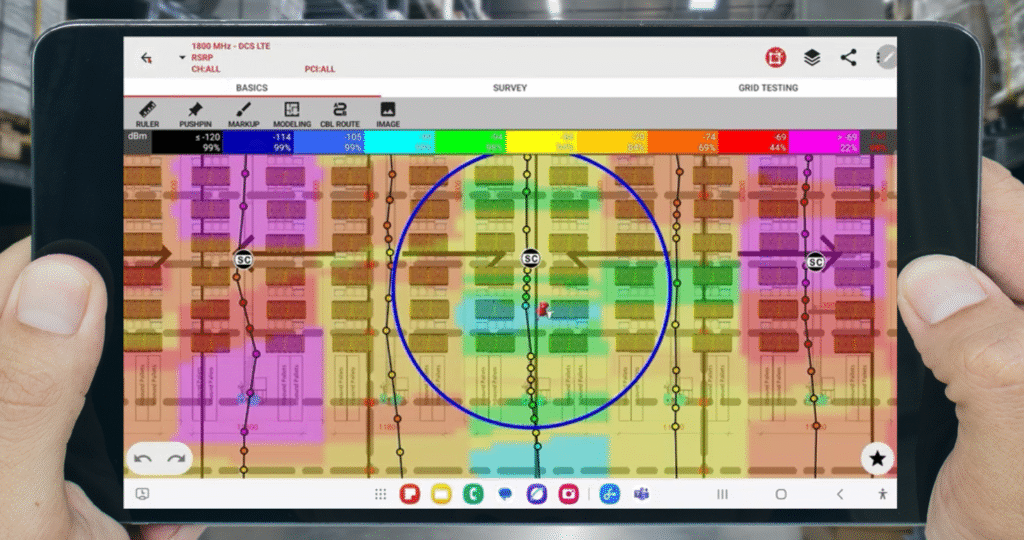
Even well-designed private networks face recurring problems:
Inconsistent Coverage
Dead zones can result from:
- Signal-blocking structures like metal racks, thick walls, or machinery.
- Variable warehouse conditions (full vs. empty racks).
- Outdoor obstacles like terrain, vegetation, or weather.
Interference
Nearby public networks or industrial equipment can cause frequency overlap or RF noise — disrupting connectivity and increasing latency.
Poor Signal Quality
Caused by misaligned antennas, damaged cables, or environmental obstructions.
Limited RF Expertise on IT Teams
Most enterprise IT pros excel at Wi-Fi and wired networking but lack the RF skills to diagnose issues like PCI collisions, SINR degradation, or spectrum interference quickly.
Tools That Bridge the RF Knowledge Gap
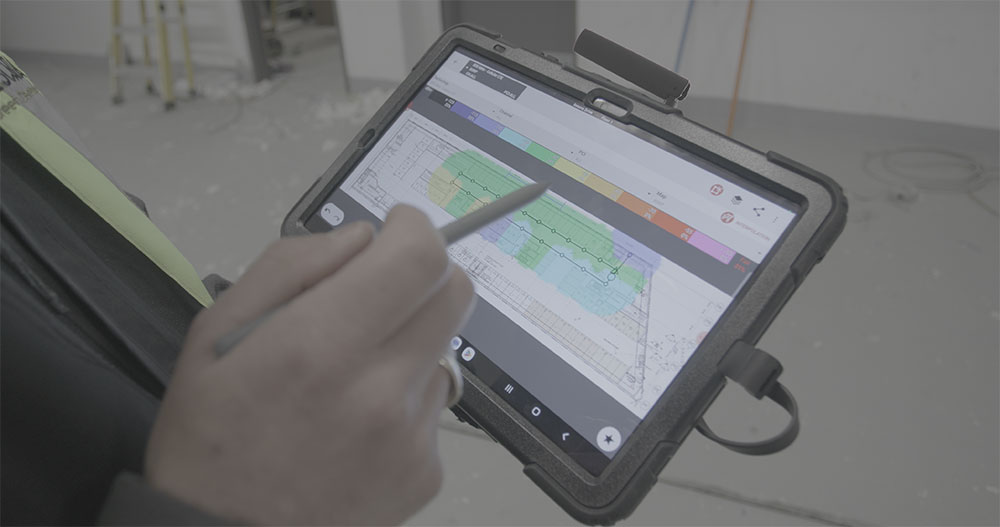
Modern portable survey kits like the Epiq PRiSM scanner plus and iBwave Mobile Survey app make professional-grade troubleshooting possible for non-RF specialists:
- Epiq PRiSM Scanner: Lightweight, handheld spectrum analyzer & PCI scanner for real-time data collection indoors or outdoors.
- iBwave Mobile Survey App: Maps coverage, visualizes KPIs, and stores results with GPS or manual waypoint tracking.
- iBwave Unity Cloud Storage: Centralizes data for collaboration and remote troubleshooting.
This integrated approach reduces downtime by eliminating the need for bulky gear, manual report creation, and repeated site visits.
Field-Proven Troubleshooting Workflow for Troubleshooting LTE & 5G Networks
Here’s the proven, repeatable process for diagnosing and resolving LTE/5G issues — based on real warehouse deployments:
- Get the Floor Plan
Download it from your management platform with all antenna and small cell locations marked. - Gather Your Tools
- PRiSM scanner
- Android tablet with iBwave Mobile Survey
- USB connection cable
- Run a Spectrum Analysis
Detect interference, check signal strength, and scan relevant LTE/5G frequency bands. - Perform a PCI Scan
Identify and map cell IDs, either via blind scan or by scanning known channels. - Collect Coverage Data
Walk the site, log waypoints on the floor plan, and visualize results in real time. - Analyze KPIs
- RSRP (signal strength)
- RSRQ (signal quality)
- SINR (interference levels)
- CQI (channel quality)
- Throughput & Latency for real-world performance checks.
- Document & Annotate
Take pictures, mark problem spots, and attach notes directly to the digital floor plan. - Take Action
Replace faulty antennas, adjust placement, add small cells, or mitigate interference. - Re-Survey
Validate that 100% coverage has been restored and all KPIs are back within acceptable thresholds.
Key Performance Indicators for Troubleshooting LTE & 5G Networks: Measurements to know when Troubleshooting Private LTE and 5G Networks
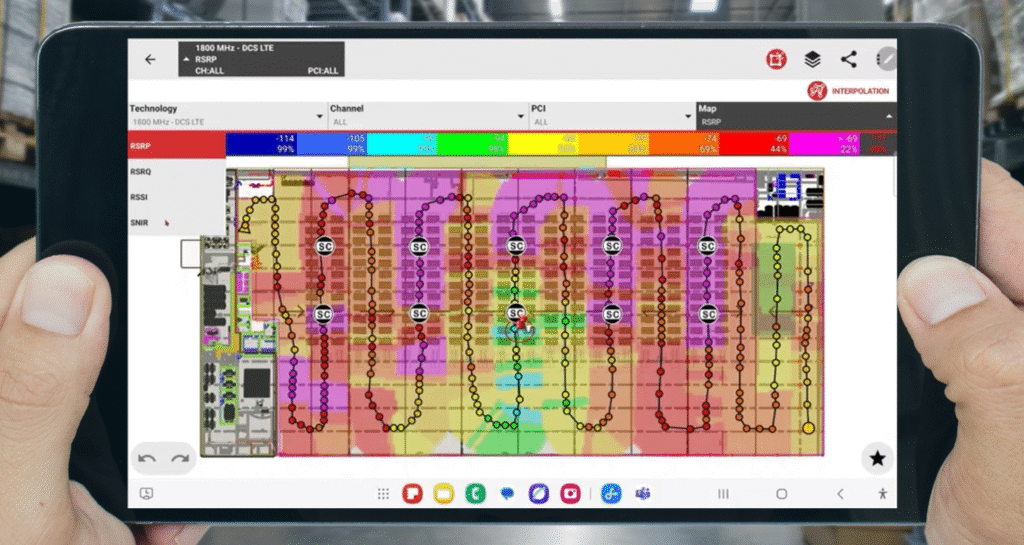
Here’s a comprehensive list of key performance indicators (KPIs) used during LTE and 5G private network site surveys. IT managers
RSRP (Reference Signal Received Power)
What it is: RSRP indicates the average power of reference signals received from a single cell, used to assess signal coverage. Values from -80 dBm to -90 dBm are generally considered good, while values below -100 dBm are poor.dBm). A better indicator of signal coverage than RSSI.
If RSRP is poor: Reposition antennas, optimize antenna tilt/azimuth, or consider adding small cells.
Common factors that affect RSSI:
- Building materials
- Distance
- Indoor vs. outdoor location
- Antenna orientation
RSRQ (Reference Signal Received Quality)
What it is: RSRQ indicates signal quality by combining signal strength and interference/load levels. RSRQ reflects signal quality by combining RSRP and RSSI, giving a measure of interference and loading on the cell. A lower RSRQ (e.g., below -10 dB) can indicate congestion or interference even when signal strength is acceptable.
If RSRQ is poor: Reduce interference by optimizing frequency reuse or PCI planning or manage network load.
Common factors that affect RSRQ:
- Interference
- Network congestion
- Poor RSRP relative to RSSI
RSSI (Received Signal Strength Indicator)
What it is: RSSI measures the total received power (including noise and interference) from the serving cell. Values below -100 dBm typically indicate weak signal reception and potential connectivity issues.
What to do about low RSSI: If RSSI is low (e.g., < -100 dBm): Improve antenna positioning, add repeaters, or increase transmit power.
Common factors that affect RSSI:
- Distance from antenna
- Obstacles (walls, machinery)
- Environmental clutter
SINR (Signal-to-Interference-plus-Noise Ratio)
What it is: SINR is a measure of signal quality by comparing the desired signal to background interference and noise. High SINR (e.g., >20 dB) indicates clean transmission, while low SINR (<5 dB) suggests heavy interference or poor conditions.
If SINR is low: Identify and eliminate interference sources, shield critical areas, or deploy frequency planning.
Common factors that affect SINR:
- Co-channel interference
- Physical obstructions
- Environmental noise
CQI (Channel Quality Indicator)
What it is: A user-reported metric indicating how well the device perceives the channel quality. CQI is reported by the user device to the base station, indicating how well it can receive the signal. Higher CQI values (1–15 scale) mean better channel conditions and enable higher data throughput.
If CQI is low: Focus on improving SINR, optimize MIMO settings, or adjust transmission parameters.
Common factors that affect SINR:
- SINR
- Fading
- Device capability
PCI (Physical Cell Identity)
What it is: PCI is a unique identifier for a cell used by user equipment (UE) to distinguish between neighboring cells. PCI confusion or collisions can cause handover issues and poor cell selection.
If PCI collisions/confusion occur: Redesign the PCI plan to ensure uniqueness among neighboring cells.
What causes PCI collision/confusion:
- Poor network planning, especially in dense deployments.
EARFCN / NR-ARFCN (E-UTRA / NR Absolute Radio Frequency Channel Number)
What it is: EARFCN / NR-ARFCN denotes the channel/frequency being used. It specifies the frequency on which a signal is received; used to verify spectrum configuration and identify co-channel interference. Ensures correct frequency planning and helps isolate overlapping channels.
If interference is present on a frequency: Adjust or reassign channels to avoid overlap.
Affected by:
- Overlapping frequencies
- Shared spectrum
- External interference
Throughput Downlink / Uplink (DL/UL)
What it is: Downlink and uplink is a measure of the rate of data successfully transmitted. In plain terms, this is the actual data transmission rate experienced by the user device (downlink and uplink). Useful for evaluating the real-world performance of the network under various conditions.
If throughput is low: Investigate signal quality (RSRP/SINR), network congestion, and backhaul performance.
Common factors that affect DL/UL:
- Network congestion
- Poor signal quality
- Backhaul limitations.
- Device capability
Latency (Ping Delay)
What it is: Latency is the time it takes for data to travel to its destination and back. Latency is a measure of the round-trip time for data to travel from the user device to the server and back. Lower latency (e.g., <20 ms in private networks) is essential for time-sensitive applications like industrial automation.
If latency is high: Optimize routing paths, prioritize traffic, and review QoS settings.
Common factors that affect latency:
- Routing inefficiencies
- Backhaul issues
- Congested links, when a communication gateway is handling more data than it can efficiently process or transmit.
Best Practices for Reliable Coverage
- Design for the Device Height: In warehouses, AGVs operate ~20 cm off the ground — coverage must be tested at that level.
- Account for Environment Changes: New racks, machinery, or storage layouts can alter RF conditions — re-survey after changes.
- Aim for 100% Coverage in 100% of the Area: In industrial environments, even a 1% gap can cause major disruptions.
- Keep a Digital Twin: Store floor plans, antenna locations, measurement history, and annotations in the cloud for faster future troubleshooting.
- Train IT Teams on KPIs: Understanding RSSI, SINR, and RSRQ accelerates root cause identification.
Common Troubleshooting Pain Points in Troubleshooting LTE & 5G Networks
Troubleshooting private LTE and 5G networks comes with several recurring pain points that can disrupt even well-designed deployments. These issues often require specialized tools and deeper RF knowledge to resolve quickly and effectively.
Inconsistent Coverage
One of the most frequent problems is inconsistent coverage, which can lead to:
- Dropped calls
- Slow data speeds
- Communication blackouts in critical zones
For example, a manufacturing plant might experience dead zones where wireless devices fail to connect—causing workflow delays and safety concerns.
Indoor networks often have several key factors that affect coverage:
- Signal-blocking structures (e.g., metal-framed walls)
- Interference from furniture, equipment, or human activity
- Complex layouts that hinder signal propagation
Outdoor networks face challenges as well, such as:
- Weather-related attenuation (rain, fog, wind)
- Terrain interference from hills, dense vegetation, or uneven landscapes
For large outdoor sites like warehouses, logistics yards, or construction zones, these issues make it essential to have ongoing monitoring and troubleshooting .
Interference
Interference from nearby public cellular networks can cause issues, especially in dense urban or industrial environments. Public networks are designed to support a large number of users and can disrupt the carefully managed frequencies of private networks. This interference can result in dropped connections, lower data rates, and increased latency, which are not acceptable in industrial environments.
Public networks:
- Operate on shared or adjacent frequency bands
- Fluctuate based on traffic loads and user behavior
- Can unpredictably disrupt private network performance
Public network interference can increase latency, lower data throughput, and can cause connection instability.
The changing nature of public network traffic can also result in unpredictable interference, making it a ongoing threat to private network performance, requiring analysis and monitoring to address.
Signal Quality and Antenna Issues
Poor signal quality often results from:
- Suboptimal antenna placement
- Damaged or misconfigured hardware
- Environmental obstructions, such as tall buildings or physical barriers
Even high-performing equipment will struggle without a well-planned deployment strategy. Snow, rain, and extreme temperatures can further degrade signal performance, especially outdoors.
Spectrum analyzers and site surveys are essential for identifying and resolving these types of issues.
Limited RF Expertise on IT Teams
Many enterprise IT professionals are skilled in Wi-Fi and traditional networking but lack the RF knowledge required to troubleshoot LTE and 5G networks.
RF troubleshooting requires specialized knowledge, including signal propagation, interference analysis, and spectrum management
This limited experience
- Delays in diagnosing root causes
- Prolonged network downtime
- Inefficient resource use
Bridging this gap often requires collaboration with RF specialists or investing in training and support for internal teams.
This knowledge deficit can result in protracted periods of network inactivity and inefficiency, as the identification and resolution of even minor issues can be time-consuming.
The Bottom Line
Troubleshooting LTE and 5G networks doesn’t have to be slow, complex, or require a senior RF engineer on-site. With the right workflow, best practices, and integrated toolset, IT teams can:
- Detect issues in minutes.
- Resolve them before they disrupt operations.
- Maintain consistently high performance in mission-critical environments.
Watch our short webinar to get even more insights into troubleshooting LTE & 5G Networks.
If you want to experience this process firsthand, request a live demo with the full PRiSM scanner kit. The faster you can identify and fix issues, the more reliable — and valuable — your LTE/5G network will be.
Ralf has more than 28 years of experience in telecommunications and more than 14 years of experience in a people management role.
Ralf graduated with a diploma in Telecommunications on “Indoor wireless Coverage solutions” in Germany in 1995 and started his wireless career as Radio Design Engineer at Motorola in Hungary and Austria.
Working for System suppliers and network operators in various countries, he developed strong intercultural communication and relationship skills, functional & technical know-how and essential business skills.
In his different roles for global network operators he gained expertise as Network Design Engineer at VIAG Interkom (now Telefonica) in Germany in year 1997, followed by RF Planning & Network Optimization Manager at tele.ring (now t-mobile) in Austria in year 2000, followed by Head of Radio Network Planning & Optimisation at Hutchison 3G Austria in year 2001.
In 2006, Ralf joint Shyam Telecom GmbH in Germany in his role as Chief Technical Officer, responsible for the European business of the Indian based network equipment supplier ShyamTelecom for radio signal enhancement and IP backhaul solutions.
During his career, Ralf continuously participated at conferences and tradeshows as a delegate and speaker.
Ralf joined iBwave in year 2015, responsible for Sales Engineering for Central & Eastern Europe, UK and Nordics. He is also an iBwave certified instructor for In-Class training courses.
- The Three Hidden Killers of Industrial RF - July 24, 2026
- Troubleshooting LTE & 5G Networks in Complex Environments - January 13, 2026
- How to Design Wireless Network for Stadiums: Key Insights and Strategies - July 18, 2024