

The Enterprise Guide to Better Cellular Connectivity

Share

A Practical Guide: Get Started on the Right Path
The Real Cost of Poor Cellular
Poor cellular coverage isn’t just a nuisance; it’s a serious operational risk. In warehouses, robots and scanners fail mid-task. On plant floors, calls and tablets drop, stalling production. At ports and yards, gate scans fail and vehicles back up. In mines, telemetry gaps delay man-down alerts, risking safety. The costs quickly surface as overtime, rework, safety incidents, and lost productivity, impacting the bottom line and company reputation.
The causes are usually in plain sight: thick concrete walls, steel racks, long aisles, stacked shelves, mezzanines, and corners that macro LTE/5G networks can’t penetrate.
And the bar keeps rising. As more enterprises look to deploy AI, IoT, VR, Robotics, AR/VR, connected vehicles, and safety systems, all depend on low-latency cellular connectivity. Simply put: unreliable connectivity means unreliable productivity.
The good news: there are several options for an enterprise to achieve reliable cellular connectivity, each serving different needs. Repeaters quickly and affordably pull a strong outdoor signal indoors for smaller venues or when fast improvement is needed. Private LTE/5G networks provide more control and quality of service, making them ideal for mission-critical or high-capacity applications. Distributed antenna systems (DAS) are built for large, complex sites where multi-carrier support and extensive coverage are required.
The main challenge for enterprises is deciding which cellular solution best fits each scenario.
Let’s discuss.
Evaluating Options
For enterprises, the challenge of cellular connectivity can feel big. The solution is not always clear, and there is more than one path to take; from quick, affordable wins for simpler indoor venues to larger, more expensive solutions that can span complex environments and campus-wide networks.
Entry-level investments start at a few thousand dollars and can be effective for pulling in strong outdoor signals to quickly level up the indoor network.

Bespoke, large-footprint solutions increase costs by 10 to 100x, but are often necessary for more complex sites and mission-critical applications.
The right choice for an enterprise depends on a few key factors: their objective, their short- and long-term use cases, how much they must spend, the existing physical environment and infrastructure, and their existing wireless environment.
The key is making sure enterprises are thinking through the whole picture, both short- and long-term, so they make the right choice the first time.
Define “Good” First, Choose a Solution Second
Before enterprises pick a solution and order hardware, it’s important for them to think in terms of outcomes and define what ‘good connectivity’ means for the business. Does it mean that scanners don’t drop? That AMRs won’t be noticeably looking for signals? That worker safety is never put at risk? This is a key question to ask before any solution is selected, and the answers soon become a filter for which solution is the best fit for them: repeaters, small cells, private LTE/5G, DAS.
Objectives should be short, specific, and measurable. If an objective can’t be verified during or after deployment, then it isn’t a good objective.
Examples might include:
- People, Devices, and Places: who needs signal, what is it needed for (i.e. scanners, tablets, AMRs, radios, etc.), and in which areas coverage needs to work every time.
- Performance and Reliability: no dead zones, fast enough to complete the job at hand, and can stay connected while moving (if required).
- Ready for New Tech: AI, IoT sensors, robotics/AMRs, AR/VR, and video may need to be supported at some point.
- Service Model: is there a preference for single or multiple service providers? Or a preference for private LTE/5G?
- Future-proofing: easy to expand, add bands, or extend to future buildings without a rebuild.
- Security & Safety: who can connect? How should traffic be separated? And how sensitive is the data?
- Budget & Roll out: what is the budget? What is the expected payback window? OpEx or CapEx? Are permits required for access?
Assembling and prioritizing these objectives will create a clear vision of requirements. But it’s also important to verify what existing on-site RF coverage looks like before any investment is made because clear objectives and good RF data will point to the right solution for an enterprise the first time.
Know What Exists Today, Before Spending on Tomorrow
Gaining a clear picture of how today’s LTE and 5G actually perform at an enterprise site, including its buildings and infrastructure, should be the baseline for every decision thereafter. A measured view of real performance enables enterprises to compare options on the basis of facts and choose the right action the first time.
That picture needs to include both indoor and outdoor coverage and performance, and an understanding of what will help or hurt signal propagation along the way. Concrete, steel, low-E glass, long aisles, basements, stairwells, tunnels, underground parking, busy outdoor yards, all typical factors that can impact wireless connectivity.
Understand the RF Outside the Building
Many service providers publish online coverage maps that estimate the outdoor signal near an enterprise site. These maps are useful for visual and broad indications of available signal strength. However, they lack critical information that matters for decision-making: congestion at peak times, uplink performance, local obstructions, and the exact signal quality at the site perimeter.
The signal available at any location is influenced by both the network’s current load and the natural and manmade features around the buildings. Because the outdoor “donor” signal directly affects indoor performance, especially repeater‑based solutions, it’s important to confirm what’s truly available, not just what’s predicted.
Enterprises should aim for an accurate view of signal strength, capacity, and speed for each mobile operator. A short outdoor survey (walk or drive) around the site and approaches will show whether each network’s outdoor signal can support indoor options. That same information helps guide conversations with service providers about improvements or planned upgrades.
Understand the RF Inside the Building
Indoor cellular performance varies widely across a single floor, let alone an entire building or campus. Buildings shape radio signals: the layout, wall materials, contents and equipment within the walls, and even the frequency bands in use can mean one corner is a dead zone and the next a hot spot.
What impacts indoor signals?
- Materials: metal, brick, concrete, low‑E glass, metal tints, double glazing, roofing, all reduce or reflect the signal.
- Layout & contents: long aisles, mezzanines, machinery, racking, and stacked stock create shadows and reflections.
- Other systems, such as Wi‑Fi, PTT, industrial wireless, and building systems, can interact with each other and introduce noise.
- Frequencies: lower bands travel farther through walls but carry less capacity; higher bands carry more data but struggle to penetrate.
Bottom line: these factors can be managed, and they should be part of the guiding process of which cellular coverage solution fits best, but the starting point is a proper survey.
| Factor | Typical impact | Common Clues to Look For |
| Concrete/steel & low‑E glass | Strong attenuation, reflections | Bars near windows, drops in cores/stairwells, recent window upgrades |
| Long aisles & high racks | Shadow zones, multipath | Scans fail mid‑aisle; good at ends, bad in middle |
| Machinery & equipment | Localized blocking/noise | Calls drop when machines run |
| Building layout (mezzanines, basements) | Uneven signal by level | Good upstairs, poor in basement/mezzanine |
| Frequency band used | Penetration vs. capacity tradeoff | Good voice, slow data in thick-walled areas |
Surveying the Environment
A cellular survey gives an evidence-based picture of what LTE and 5G are doing on site: where the signal is strong or weak, how fast data moves, and where latency or handovers cause issues. That clarity lets teams prioritize potential solutions.
Who conducts surveys?
- Typically: service providers and system integrators.
- Increasingly common: in-house enterprise teams using professional tools (e.g., iBwave Mobile Survey) to speed assessments and iterate designs.
What insights should the survey provide?
- Outdoor (“donor”) status by carrier: strength and quality that indoor solutions can leverage.
- Indoor hotspots and dead zones: specific rooms, aisles, docks, mezzanines, basements.
- Performance issues: slow uploads/downloads, lag, failed handovers, and interference between systems.
- Actionable metrics: enough detail to test options against the enterprise’s objectives.
Why it matters
- Links coverage reality to objectives and SLAs.
- Supports prioritization, budgeting, and phased rollout plans.
- Enables informed dialogue with providers on macro improvements and the suitability of repeaters, small cells, private LTE/5G, or DAS.
Bottom line: Enterprises must measure existing coverage before selecting a solution. A thorough indoor survey turns guesswork into a reliable coverage plan.
Matching Cellular Solutions to Real Needs
With a clear baseline, enterprises can work with partners (e.g, service providers, system integrators, OEMs) to choose the right path forward, fast fix or full build. Most enterprises select from four main options: Repeaters, Small Cells, DAS, and Private LTE/5G. Repeaters offer speed and cost-efficiency for simple needs; Small Cells allow more network control and customization; DAS is suited for large campuses and multi-carrier requirements; Private LTE/5G delivers private, secure, and high-capacity connectivity. The goal is to match each solution to the enterprise’s needs and validate with proper design.
Guiding Thought: If the outdoor (donor) signal is strong and consistent, repeaters are usually the best starting point due to speed and cost. If control, security, or additional capacity are requirements for the business, small cells or private LTE/5G networks bring those advantages. For large campuses with multiple carriers, DAS offers the scale and flexibility needed. Always weigh each option’s strengths against the enterprise’s objectives and environment.
Repeaters (Signal Boosters)
When the outdoor (donor) signal is healthy, repeaters are the fastest way to enhance indoor coverage. They don’t add capacity, but they can quickly turn dead zones into usable connectivity, with minimal disruption and cost.
- Best for: fast, reliable indoor coverage where the outdoor signal is strong.
- What they do: capture, amplify, and rebroadcast existing LTE/5G, extending a good outside signal indoors.
- Best for: quick wins when the outdoor signal is strong.
- How it works: picks up the outside LTE/5G signal, boosts it, and rebroadcasts it indoors.
- Pros: Lowest cost; fast to install; little disruption; units can be moved later.
- Watch‑outs: doesn’t add capacity; quality depends on the outside signal; need to check local regulations and carrier approvals.
- Install & timeline: power and mounting only; usually days to a few weeks per building.
- Cost signals: scales with the number of areas to cover and any survey/design/installation services.
Private 5G
Private 5G suits enterprises that need predictable performance, strong security, enhanced capacity, and control over who uses the network and how. It’s an investment, but it puts critical applications on a network designed specifically for them.
- Best for: sites that need predictable performance, capacity, control, ultra-low latency, and strong security.
- What it is: a dedicated 5G network that the enterprise runs (or has managed for them).
- Pros: consistent performance; capacity placed where it’s needed; tight control of who uses it and how.
- Watch‑outs: more time and money to plan and run; needs spectrum and ongoing operations.
- Install & timeline: from spectrum and design to live service takes longer; usually piloted first.
- Costs: case‑by‑case; can range from thousands of dollars to tens or hundreds of thousands, depending on size and scope.
DAS (Distributed Antenna System)
For large venues and multi-building campus sites that must support several carriers, a DAS delivers uniform coverage by sharing radio across a common antenna network. It’s a bigger project, but built for scale.
- Best for: large venues and campuses that need coverage from multiple carriers.
- How it works: shares radio from carriers (or on-site radios) over a common antenna network.
- Pros: uniform coverage across big spaces; supports several operators and bands.
- Watch‑outs: more planning, construction, and coordination with carriers; longer timelines.
- Install & timeline: surveys, design, permits, cabling, head‑end space; delivered in phases for speed.
- Costs: driven by area covered, number of carriers/bands, and building complexity.
Small cells (incl. picocells, femtocells, radio dots)
Small cells shine when specific areas need both a stronger signal and more capacity, or when the donor signal outside is weak. Think targeted upgrades for high-traffic areas such as aisles, docks, labs, or offices.
- Best for: areas that need both a stronger signal and greater capacity (e.g., high‑bay aisles, docks, offices).
- How it works: small indoor base stations with their own backhaul that don’t rely on outside signal.
- Pros: adds capacity; targeted placement; works where the outdoor signal is weak.
- Watch‑outs: often single‑carrier; more planning and cabling than repeaters.
- Install & timeline: power/network cabling and mounting; longer than repeaters but shorter than DAS.
- Costs: equipment count, cabling/backhaul needs, and integration work.
- Small Cells (including Picocells, Femtocells, and Radio Dots) are small indoor base stations that provide cellular coverage (signal and capacity), typically for a single service provider, although solutions are also available for multi-operator coverage.
Quick Compare: Cellular Options
| Option | Best For | What It Does | Key Trade-Offs |
| Repeaters | Quick wins when outdoor (donor) signal is strong | Captures, boosts, and rebroadcasts existing LTE/5G indoors | Lowest cost and fastest install, but doesn’t add capacity; quality follows outside signal; may need carrier/regulatory approval |
| Small cells | Hot zones needing stronger signal and more capacity, or weak donor | Indoor base stations with their own backhaul | Adds capacity and works where donor is weak; more planning/cabling than repeaters; often single-operator |
| DAS | Large venues/campuses needing multi-carrier coverage | Shares carrier/on-site radio over a common antenna network | Uniform coverage at scale; longer timelines and more coordination; cost driven by size and carriers/bands |
| Private 5G | Sites needing control, security, and predictable performance | Dedicated enterprise-run cellular network | Deterministic performance and segmentation; higher CapEx/OpEx and spectrum/ops requirements; typically pilot first |
Bringing It All Together
In the end, reliable cellular networks are not just one magical product. It’s achieved by looking at a sequence of key considerations: the enterprise’s objectives and use cases, the starting RF landscape, and any budget limitations. With an understanding of those three things, enterprises are then armed with the information they need to choose the right solution, prove it, and then eventually scale it.
Important things to keep in mind:
- Objectives first: use cases and outcomes need to be understood first and tied to real work.
- Measure everything: confirm the outdoor donor signal and understand indoor performance gaps, don’t make the mistake of relying solely on publicly available coverage maps.
- Match the solution to the job: several solutions are possible, but there are key factors to consider when selecting one that will put the enterprise in the best position for wireless success.
- Pilot and test where it matters: test performance in real zones, at peak times, with real devices.
- Measure from day one: monitor coverage, drops, latency, and handovers; fix what the data shows.
- Plan the path forward: start with a single high-value use case and phase work by priority to the business; establish collaborative partnerships early and keep budget and ROI trackable and visible.
When enterprises take the time to align goals with the on-site RF reality first, the return on investment becomes obvious: a reliable network that supports mission-critical apps without fail, safer operations, minimal troubleshooting, no unplanned outages, and network headroom to scale automation with future technologies.
Bringing Cellular Surveys & Troubleshooting In-House
Enterprises can gain greater control by understanding their existing wireless environment through in-house site surveys conducted by IT/OT teams and by enabling more informed collaboration with their integrator or service provider partner. This complements partner-delivered surveys, many programs use both approaches in parallel.
iBwave Mobile Survey + Scanner: A Small but Mighty Cellular Survey Solution
Traditionally, cellular survey scanners are complex kits that can be difficult for a non-RF engineer to use. They are also often overkill for the job at hand in an enterprise, and cost-prohibitive to enterprise budgets.
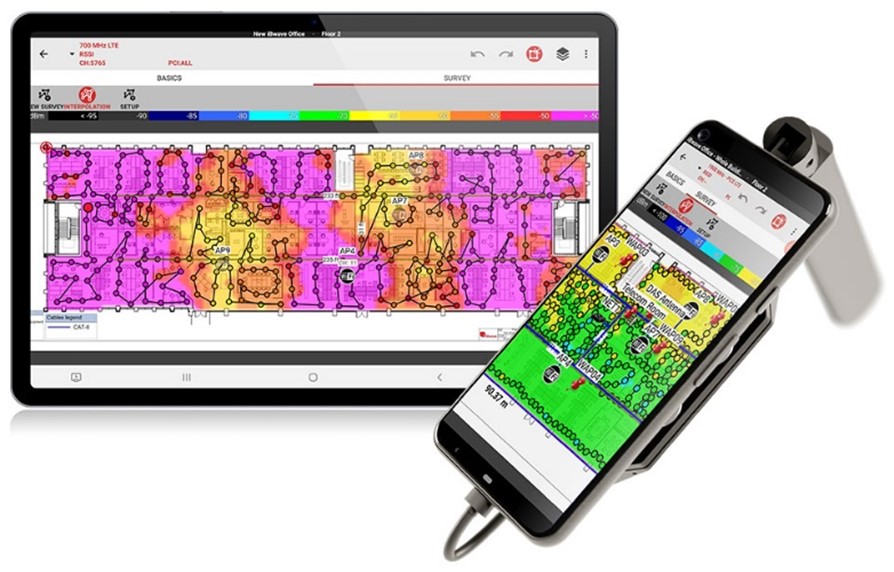
The iBwave survey solution, consisting of a small, lightweight cellular scanner and spectrum analyzer that magnetically attaches to the back of a tablet and runs iBwave Mobile Survey, is quickly becoming the choice for enterprise teams to quickly understand their cellular networks, both before and after deployment.
The Epiq scanner is a small, lightweight cellular scanner that magnetically attaches to the back of a tablet running a survey app, can assess multiple channels per walk, supports both indoor and outdoor surveys, and comes with a high-end spectrum analyzer. Survey measurements captured by the scanner are robust and record key indicators that help understand the wireless environment, such as received power, signal quality, and interference. All useful inputs for the enterprise team to better understand their cellular wireless landscape, and to have informed conversations with their integrator or service provider partners.
Together, the scanner and mobile app offer a simplified, user-friendly, and purpose-fit cellular survey solution for private networks, putting in-house surveys and first-line troubleshooting within reach for enterprise teams.
iBwave Mobile Survey, usable on any Android tablet, guides teams through setting up the floor plans and walk paths, and lets teams pin photos or notes to exact locations. Step-by-step prompts keep surveys consistent and repeatable across teams, enabling teams to get up and running quickly.
Outputs, Collaboration & Workflows
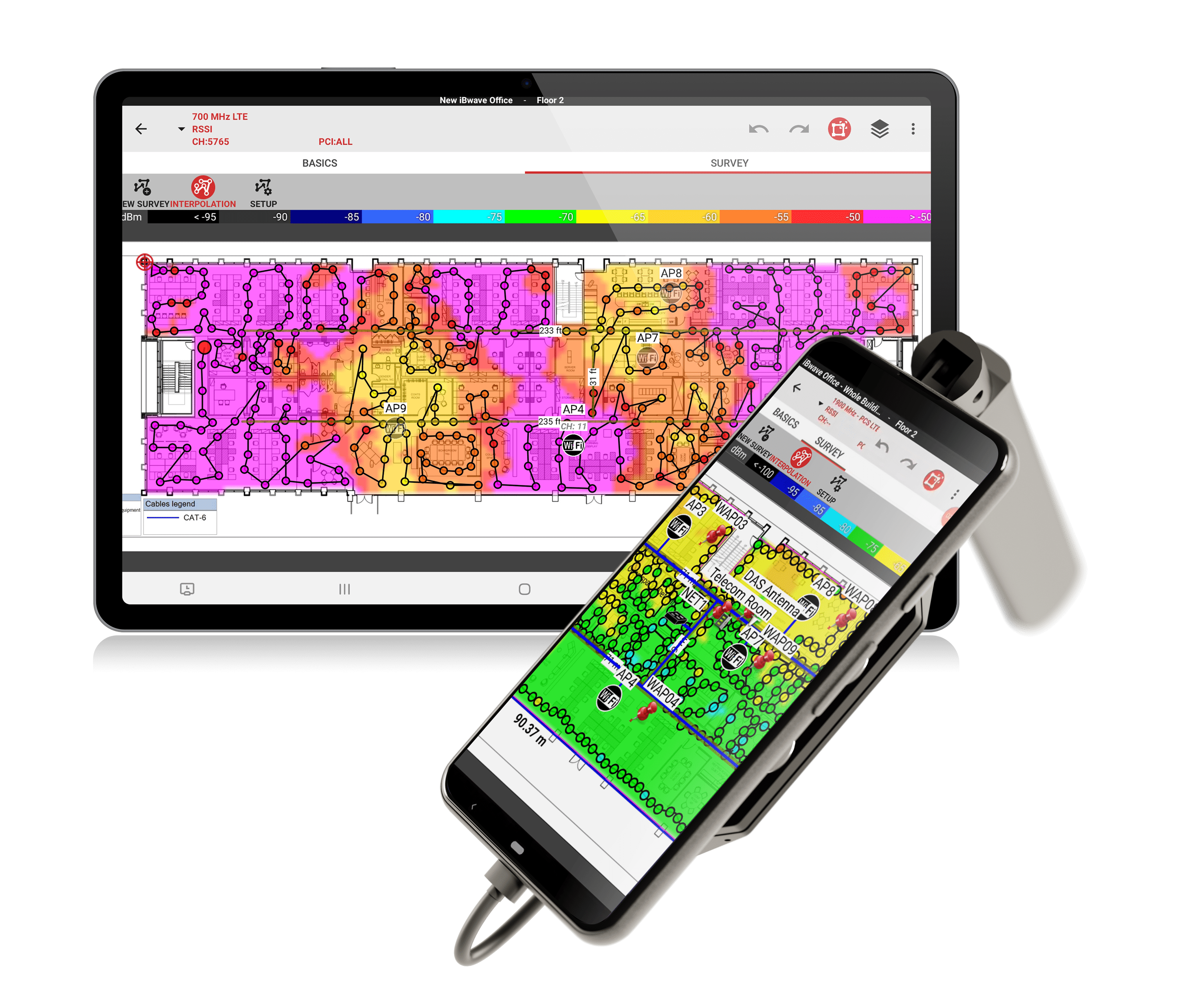
The iBwave cellular survey solution generates industry-standard outputs. Clear heat maps show coverage quality and frequency variation across the survey area, creating a reliable baseline for comparing providers and bands. Reports include detailed views of coverage, capacity, and related KPIs.
iBwave Unity Cloud streamlines site surveys and makes it easy for enterprises to collaborate with external partners, so teams can make decisions faster and fix issues sooner. With measured survey data and a clear picture of the RF environment, enterprises can better align with service providers, integrators, and vendors on the right solution for their goals and timelines.
Tables
Factors Affecting Indoor Coverage & Capacity
| Factor | What It Means | Common Impacts |
| External signal (donor) quality | Strength and cleanliness of the signal entering the building | Sets a limit for indoor performance; weak/noisy donor = weak indoor results |
| Signal frequencies | Low frequencies penetrate well but have low capacity; high frequencies carry more data but penetrate poorly | Low frequencies = reach; high frequencies = speed. Mixed results across the same floor. e.g. Low Emissivity metalized Glass reflects signals; Metal tints block RF; Double Glazing creates multi-layer reflections |
| Building materials | Walls, glass, low E-glass, metal, concrete, reinforced concrete | Can severely impact signal quality in a building. |
| Conflicting signals | Other networks (LTE/5G, Wi-Fi, etc.) operating nearby | Interference, retries, slow uploads/downloads |
| Building contents | People, products, stock, racking, machinery | Shadow zones, reflections, and moving “walls” that change by shift |
iBwave Cellular Survey Solution: What’s Included
| Component | Description | What You Get |
| Epiq Scanner | Epiq Prism scanner for cellular surveys, magnetically attaches to the back of an Android tablet | 4G/5G coverage; 70 MHz to 6 GHz (6000 MHz); scans up to 8 frequencies per walk. |
| iBwave Mobile Survey | Survey mobile app, seamlessly integrates with Epiq scanner | Guided floor-plan setup, walk paths, survey heatmaps, geo-located notes/photos/voice tags |
| Samsung tablet | Compatible Samsung Galaxy tablet (rugged options available) | Handheld form factor; magnetic mount with the scanner |
| iBwave Cloud | iBwave Unity Cloud | Workflow support and post-survey collaboration/sharing |
| Training & Certification | Onboarding plus optional training and certification courses | Faster ramp-up, internal cellular knowledge upskilling |
iBwave delivers the simplest and most reliable solution for planning, designing, and delivering private, high-performance networks for smart cities and beyond.
Ready to stop guessing about cellular coverage?
Before choosing a repeater, small cell, DAS, or private 5G network, start with the one thing every successful deployment needs: reliable RF data.
With iBwave Mobile Survey + Scanner, enterprise IT and OT teams can quickly capture indoor and outdoor LTE/5G survey data, identify dead zones, compare carrier performance, and create clear heat maps and reports to guide better decisions.
Whether you’re validating coverage before a new deployment, troubleshooting problem areas, or collaborating with an integrator or service provider, iBwave helps you turn site conditions into an actionable connectivity plan.
See how iBwave Mobile Survey can help you build a reliable cellular baseline.
Kelly Burroughs has worked in the wireless industry over the last 8 years in a variety of roles. Her background in product, marketing, and wireless jokes makes her a triple threat in the industry. When she’s not busy trying to improve the wireless survey & design experience for customers, she can be found writing wireless jokes that make even the most dedicated network engineer smile (or roll their eyes).
- The Enterprise Guide to Better Cellular Connectivity - June 11, 2026
- Cleared for Takeoff: Private Networks in Aviation - January 21, 2025
- A Tour of iBwave Viewer - November 23, 2020